Hi all,
M1 Pro MBP 32/1T Tahoe 26.2 / Cabbage version:2.9.0
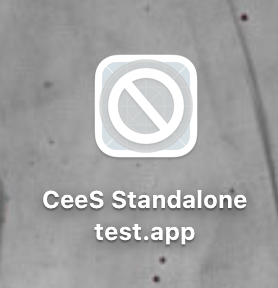
My project exports fine as a Logic Pro plug-in, but when I try to create a standalone version the app fails to launch and its icon uses that circle-slash that indicates a compatibility issue.
Opened up the package and ran the executable, which returns the following:
Last login: Tue Jan  6 17:40:29 on console

lfrancis@lfrancis-3s-mc-01 ~ % /Users/lfrancis/Pictures/killme/CeeS\ Cntrl.app/Contents/MacOS/CeeS\ Cntrl ; exit;

dyld[8623]: Library not loaded: /Library/Frameworks/CsoundLib64.framework/CsoundLib64

  Referenced from: <4A9E24E0-35E8-376D-9E72-CAEDBCCDFC6C> /Users/lfrancis/Pictures/killme/CeeS Cntrl.app/Contents/MacOS/CeeS Cntrl

  Reason: tried: '/Library/Frameworks/CsoundLib64.framework/CsoundLib64' (code signature in <DC83FEAD-0AD9-3CAE-BB5B-F90873DDF038> '/Library/Frameworks/CsoundLib64.framework/Versions/6.0/CsoundLib64' not valid for use in process: mapping process and mapped file (non-platform) have different Team IDs), '/System/Volumes/Preboot/Cryptexes/OS/Library/Frameworks/CsoundLib64.framework/CsoundLib64' (no such file), '/Library/Frameworks/CsoundLib64.framework/CsoundLib64' (code signature in <DC83FEAD-0AD9-3CAE-BB5B-F90873DDF038> '/Library/Frameworks/CsoundLib64.framework/Versions/6.0/CsoundLib64' not valid for use in process: mapping process and mapped file (non-platform) have different Team IDs), '/System/Library/Frameworks/CsoundLib64.framework/CsoundLib64' (no such file, not in dyld cache), '/Library/Frameworks/CsoundLib64.framework/Versions/6.0/CsoundLib64' (code signature in <DC83FEAD-0AD9-3CAE-BB5B-F90873DDF038> '/Library/Frameworks/CsoundLib64.framework/Versions/6.0/CsoundLib64' not valid for use in process: mapping process and mapped file (non-platform) have different Team IDs), '/System/Volumes/Preboot/Cryptexes/OS/Library/Frameworks/CsoundLib64.framework/Versions/6.0/CsoundLib64' (no such file), '/Library/Frameworks/CsoundLib64.framework/Versions/6.0/CsoundLib64' (code signature in <DC83FEAD-0AD9-3CAE-BB5B-F90873DDF038> '/Library/Frameworks/CsoundLib64.framework/Versions/6.0/CsoundLib64' not valid for use in process: mapping process and mapped file (non-platform) have different Team IDs), '/System/Library/Frameworks/CsoundLib64.framework/Versions/6.0/CsoundLib64' (no such file, not in dyld cache)

zsh: abort      /Users/lfrancis/Pictures/killme/CeeS\ Cntrl.app/Contents/MacOS/CeeS\ Cntrl


Saving session...

...copying shared history...

...saving history...truncating history files...

...completed.

Deleting expired sessions...       8 completed.


[Process completed]
Assuming the missing library is the issue, but as the au plug-in version can find it, maybe this is a bug? Cheers!