

Ok, so I’m working on getting my head around SVG code.
I didn’t get at first that with SVG (I thought it was just like some variation on png or other image mime type of extension), that you can actually have like an XML code base drawing out your background right? Ok. So I’ve started studying this and doing some online svg tutorials.
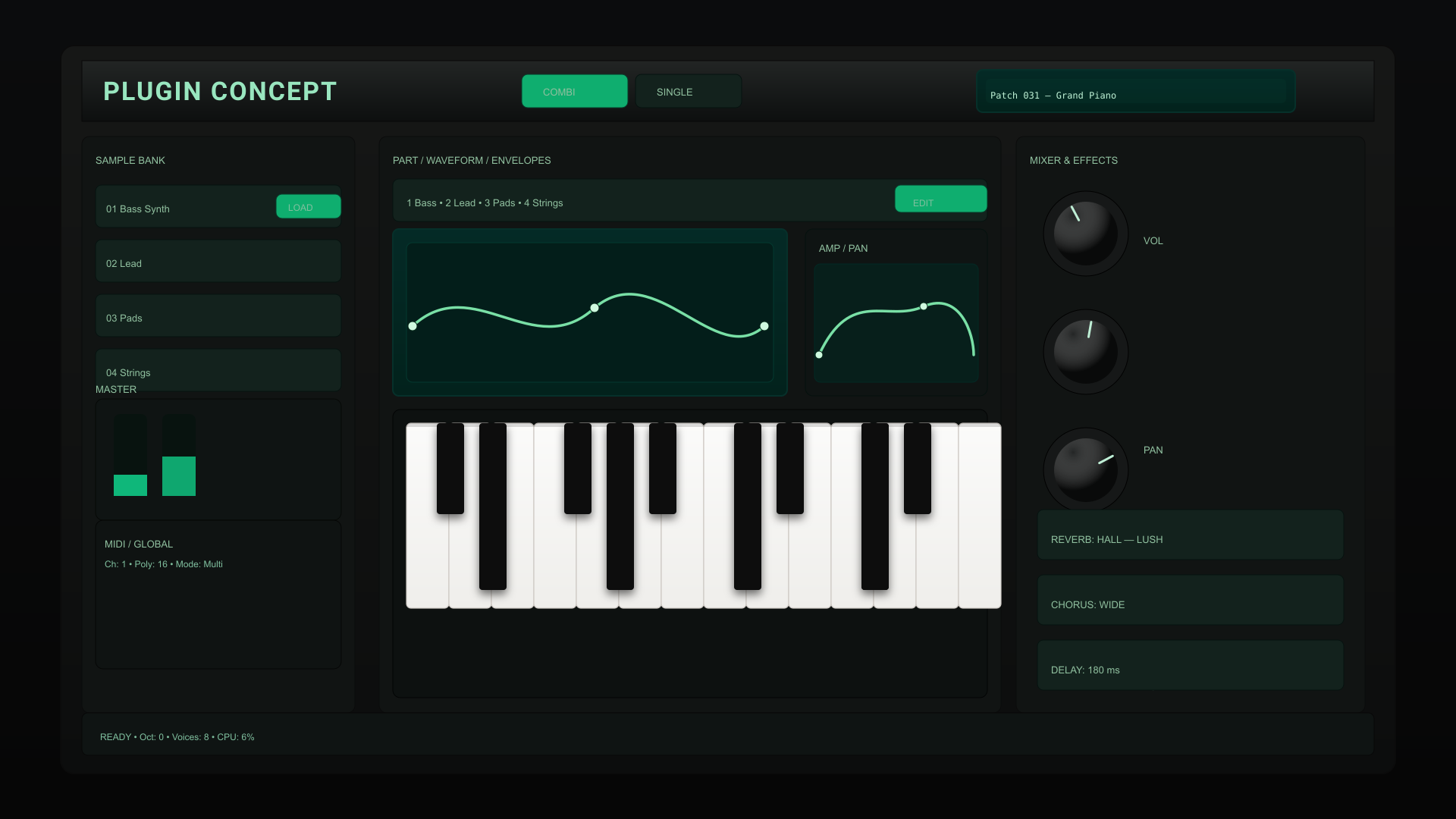
See attached?
Here’s the code
<?xml version="1.0" encoding="UTF-8"?>
<!--
Dark plugin concept with corrected (visible) white keys.
Save as plugin-concept-dark-keys-fixed.svg and open in Inkscape/Browser.
-->
<svg xmlns="http://www.w3.org/2000/svg" width="1920" height="1080" viewBox="0 0 1920 1080" preserveAspectRatio="xMidYMid meet">
<defs>
<linearGradient id="bg" x1="0" y1="0" x2="0" y2="1">
<stop offset="0" stop-color="#0b0c0d"/>
<stop offset="1" stop-color="#060606"/>
</linearGradient>
<linearGradient id="panel" x1="0" y1="0" x2="0" y2="1">
<stop offset="0" stop-color="#161716"/>
<stop offset="1" stop-color="#0c0d0d"/>
</linearGradient>
<linearGradient id="bevelDark" x1="0" y1="0" x2="0" y2="1">
<stop offset="0" stop-color="#222524"/>
<stop offset="1" stop-color="#0d0f0f"/>
</linearGradient>
<radialGradient id="knobSpec" cx="30%" cy="22%" r="60%">
<stop offset="0" stop-color="#ffffff" stop-opacity="0.06"/>
<stop offset="1" stop-color="#000000" stop-opacity="0.6"/>
</radialGradient>
<linearGradient id="lcd" x1="0" y1="0" x2="0" y2="1">
<stop offset="0" stop-color="#042a26"/>
<stop offset="1" stop-color="#02221c"/>
</linearGradient>
<!-- brighter white key gradient -->
<linearGradient id="whiteKeyGrad" x1="0" y1="0" x2="0" y2="1">
<stop offset="0" stop-color="#fbfbfa"/>
<stop offset="1" stop-color="#efeeeb"/>
</linearGradient>
<filter id="keyShadow" x="-50%" y="-50%" width="200%" height="200%">
<feDropShadow dx="0" dy="6" stdDeviation="6" flood-color="#000" flood-opacity="0.55"/>
</filter>
<style><![CDATA[
.bg { fill: url(#bg); }
.frame { fill: url(#panel); stroke:#0b0b0b; stroke-width:2; rx:18; }
.topbar { fill: url(#bevelDark); stroke:#070707; }
.title { font-family: "Segoe UI", Roboto, Arial, sans-serif; fill:#99e6bf; font-weight:700; font-size:34px; letter-spacing:2px; }
.muted { fill:#8fbf9e; font-size:13px; font-family: "Segoe UI", Arial; }
.control { fill:#111413; stroke:#0a0b0b; rx:10; }
.button { fill:#13221d; stroke:#05120f; rx:8; }
.button-lit { fill:#0fae6f; stroke:#083b2a; rx:8; }
.lcd { fill: url(#lcd); stroke:#06302a; stroke-width:2; rx:8; }
.knob { fill:#161818; stroke:#000; }
.knob-face { fill: url(#knobSpec); }
.knob-tick { stroke:#bfefd6; stroke-width:3; stroke-linecap:round; }
.key-white { fill: url(#whiteKeyGrad); stroke:#cfcac5; stroke-width:1.2; } /* visible white keys */
.key-white-shadow { opacity:0.14; fill:#000; } /* thin tonal shadow under whites */
.key-black { fill:#0a0a0a; filter:url(#keyShadow); }
.graph { stroke:#79e0a6; stroke-width:3.5; fill:none; stroke-linecap:round; }
.node { fill:#cff9df; stroke:#042819; stroke-width:1; }
.small { font-size:12px; fill:#7fbf9e; font-family: "Segoe UI", Arial; }
]]></style>
</defs>
<rect width="100%" height="100%" class="bg"/>
<g transform="translate(80,60)">
<!-- Main chassis -->
<rect x="0" y="0" width="1760" height="960" class="frame"/>
<!-- Top bar -->
<g transform="translate(28,20)">
<rect x="0" y="0" width="1704" height="80" class="topbar"/>
<text x="28" y="52" class="title">PLUGIN CONCEPT</text>
<!-- small LCD -->
<g transform="translate(1180,12)">
<rect x="0" y="0" width="420" height="56" class="lcd"/>
<rect x="12" y="12" width="396" height="32" fill="#07382e" opacity="0.28" rx="6"/>
<text x="18" y="38" class="small" style="font-family: monospace; fill:#bff2d6">Patch 031 — Grand Piano</text>
</g>
<!-- mode buttons -->
<rect x="580" y="18" width="140" height="44" class="button-lit"/>
<text x="608" y="46" class="muted">COMBI</text>
<rect x="730" y="18" width="140" height="44" class="button"/>
<text x="758" y="46" class="muted">SINGLE</text>
</g>
<!-- Left column -->
<g transform="translate(28,120)">
<rect x="0" y="0" width="360" height="760" class="control"/>
<text x="18" y="36" class="muted">SAMPLE BANK</text>
<g transform="translate(18,64)">
<rect x="0" y="0" width="324" height="56" class="button"/>
<text x="14" y="36" class="muted">01 Bass Synth</text>
<rect x="238" y="12" width="86" height="32" class="button-lit"/><text x="254" y="34" class="small">LOAD</text>
<rect x="0" y="72" width="324" height="56" class="button"/><text x="14" y="108" class="muted">02 Lead</text>
<rect x="0" y="144" width="324" height="56" class="button"/><text x="14" y="180" class="muted">03 Pads</text>
<rect x="0" y="216" width="324" height="56" class="button"/><text x="14" y="252" class="muted">04 Strings</text>
</g>
<g transform="translate(18,320)">
<text x="0" y="18" class="muted">MASTER</text>
<rect x="0" y="26" width="324" height="160" rx="10" fill="#0f1413" stroke="#060806"/>
<g transform="translate(24,46)">
<rect x="0" y="0" width="44" height="108" rx="8" fill="#08130f"/>
<rect x="0" y="80" width="44" height="28" fill="#0fb77a"/>
<rect x="64" y="0" width="44" height="108" rx="8" fill="#08130f"/>
<rect x="64" y="56" width="44" height="52" fill="#0fb77a" opacity="0.9"/>
</g>
</g>
<g transform="translate(18,506)">
<rect x="0" y="0" width="324" height="196" rx="10" fill="#0f1312" stroke="#050605"/>
<text x="12" y="36" class="muted">MIDI / GLOBAL</text>
<text x="12" y="62" class="small">Ch: 1 • Poly: 16 • Mode: Multi</text>
</g>
</g>
<!-- Center area -->
<g transform="translate(420,120)">
<rect x="0" y="0" width="820" height="760" class="control"/>
<text x="18" y="36" class="muted">PART / WAVEFORM / ENVELOPES</text>
<!-- part strip -->
<rect x="18" y="56" width="784" height="56" class="button"/>
<text x="36" y="92" class="muted">1 Bass • 2 Lead • 3 Pads • 4 Strings</text>
<rect x="680" y="64" width="122" height="36" class="button-lit"/><text x="704" y="92" class="small">EDIT</text>
<!-- waveform -->
<g transform="translate(18,122)">
<rect x="0" y="0" width="520" height="220" class="lcd" rx="10"/>
<g transform="translate(18,18)">
<rect x="0" y="0" width="484" height="184" rx="8" fill="#031e1a" stroke="#03392f"/>
<path class="graph" d="M8,110 C88,36 168,160 248,86 C328,18 408,168 472,110"/>
<circle class="node" cx="8" cy="110" r="6"/>
<circle class="node" cx="248" cy="86" r="6"/>
<circle class="node" cx="472" cy="110" r="6"/>
</g>
</g>
<!-- envelopes -->
<g transform="translate(562,122)">
<rect x="0" y="0" width="240" height="220" rx="10" fill="#0f1413" stroke="#04100d"/>
<text x="18" y="30" class="muted">AMP / PAN</text>
<g transform="translate(12,46)">
<rect x="0" y="0" width="216" height="156" rx="8" fill="#071f1b" stroke="#022924"/>
<path class="graph" d="M6,120 C48,30 96,78 144,56 C192,36 210,92 210,120"/>
<circle class="node" cx="6" cy="120" r="5"/><circle class="node" cx="144" cy="56" r="5"/>
</g>
</g>
<!-- keyboard (visual) -->
<g transform="translate(18,360)">
<rect x="0" y="0" width="784" height="380" rx="10" fill="#0d1110" stroke="#020303"/>
<g transform="translate(18,18)">
<!-- visible white keys -->
<g transform="translate(0,0)">
<rect class="key-white" x="0" y="0" width="56" height="244" rx="6"/>
<rect class="key-white" x="56" y="0" width="56" height="244" rx="6"/>
<rect class="key-white" x="112" y="0" width="56" height="244" rx="6"/>
<rect class="key-white" x="168" y="0" width="56" height="244" rx="6"/>
<rect class="key-white" x="224" y="0" width="56" height="244" rx="6"/>
<rect class="key-white" x="280" y="0" width="56" height="244" rx="6"/>
<rect class="key-white" x="336" y="0" width="56" height="244" rx="6"/>
<rect class="key-white" x="392" y="0" width="56" height="244" rx="6"/>
<rect class="key-white" x="448" y="0" width="56" height="244" rx="6"/>
<rect class="key-white" x="504" y="0" width="56" height="244" rx="6"/>
<rect class="key-white" x="560" y="0" width="56" height="244" rx="6"/>
<rect class="key-white" x="616" y="0" width="56" height="244" rx="6"/>
<rect class="key-white" x="672" y="0" width="56" height="244" rx="6"/>
<rect class="key-white" x="728" y="0" width="56" height="244" rx="6"/>
<!-- subtle top shadow line for keys -->
<rect class="key-white-shadow" x="0" y="-1" width="784" height="6" rx="0" />
</g>
<!-- black keys -->
<g class="key-black">
<rect x="40" y="0" width="36" height="120" rx="4"/><rect x="96" y="0" width="36" height="220" rx="4"/>
<rect x="208" y="0" width="36" height="120" rx="4"/><rect x="264" y="0" width="36" height="220" rx="4"/>
<rect x="320" y="0" width="36" height="120" rx="4"/><rect x="432" y="0" width="36" height="220" rx="4"/>
<rect x="488" y="0" width="36" height="120" rx="4"/><rect x="600" y="0" width="36" height="220" rx="4"/>
<rect x="656" y="0" width="36" height="120" rx="4"/><rect x="600" y="0" width="36" height="220" rx="4"/>
</g>
</g>
</g>
</g>
<!-- Right column -->
<g transform="translate(1260,120)">
<rect x="0" y="0" width="460" height="760" class="control"/>
<text x="18" y="36" class="muted">MIXER & EFFECTS</text>
<!-- knobs -->
<g transform="translate(28,64)">
<g transform="translate(0,0)">
<circle cx="64" cy="64" r="56" class="knob"/><circle cx="64" cy="64" r="42" class="knob-face"/>
<line x1="64" y1="24" x2="64" y2="44" class="knob-tick" transform="rotate(-28 64 64)"/><text x="140" y="78" class="muted">VOL</text>
</g>
<g transform="translate(0,156)">
<circle cx="64" cy="64" r="56" class="knob"/><circle cx="64" cy="64" r="42" class="knob-face"/>
<line x1="64" y1="24" x2="64" y2="44" class="knob-tick" transform="rotate(10 64 64)"/><text x="140" y="198" class="muted">PAN</text>
</g>
<g transform="translate(0,312)">
<circle cx="64" cy="64" r="56" class="knob"/><circle cx="64" cy="64" r="42" class="knob-face"/>
<line x1="64" y1="24" x2="64" y2="44" class="knob-tick" transform="rotate(62 64 64)"/><text x="140" y="354" class="muted">TUNE</text>
</g>
</g>
<!-- effects list -->
<g transform="translate(28,492)">
<rect x="0" y="0" width="404" height="66" class="button" rx="8"/><text x="18" y="44" class="muted">REVERB: HALL — LUSH</text>
<rect x="0" y="86" width="404" height="66" class="button" rx="8"/><text x="18" y="130" class="muted">CHORUS: WIDE</text>
<rect x="0" y="172" width="404" height="66" class="button" rx="8"/><text x="18" y="216" class="muted">DELAY: 180 ms</text>
</g>
</g>
<!-- bottom strip -->
<g transform="translate(28,880)">
<rect x="0" y="0" width="1704" height="56" rx="8" fill="#0f1413" stroke="#070707"/>
<text x="24" y="36" class="small">READY • Oct: 0 • Voices: 8 • CPU: 6%</text>
</g>
</g>
</svg>
I’m having an issue with this. I don’t get ‘where’ the code to fix my keys.
I’m still working through all this.
SynthEdit made certain things ‘easier’ with preexisting modules from 3rd party developers. And the alignment of your widgets and control surfaces were all done visually on the top/panel or skin view.
(SynthEdit has the DSP or panel view to work from. It was easy figuring that out without hassle)
This is truly new ground for me, so…
Like, ‘how’ do you know where all the panels, and overalls and widgets are going to ‘fit’ on the X/Y axis? Definitely not as ‘intuitive’. lol

